Sage Intacct’s Finance Intelligence Agent: How to Get Started



Key insights

Sage Intacct’s Finance Intelligence Agent lets finance teams ask questions in plain language and analyze financial data without manually building or filtering reports.

The agent follows existing user permissions and shows how answers were produced, helping teams validate results before sharing them.

Ready-to-use prompts offer a starting point, while customized questions and regular use can help teams incorporate the agent into everyday finance workflows.


Most finance teams don’t have a data problem. They have a time-to-answer problem.
If you use Sage Intacct, the information your leaders need is there in the system. But getting to it often means running reports, applying filters, exporting to Excel, and reconciling the results before you can answer simple questions.
Sage’s AI-powered assistant — the Finance Intelligence Agent — makes reporting much easier. You ask a question in plain language, and it returns the answer, the supporting detail, and the reasoning behind it.
Explore the features of Sage’s Finance Intelligence Agent and learn how it can help your organization improve reporting and decision-making.
What does Sage Intacct’s Finance Intelligence Agent do?
Whether you work in nonprofit, health care, construction, logistics, retail, or professional services, the pressure is the same. Leadership wants timely insights, and finance has to deliver them accurately while managing a growing volume of transactions.
Sage’s Finance Intelligence Agent helps by letting you:
- Ask questions in natural language instead of building or filtering reports
- Analyze, visualize, and summarize financial data without manually building reports
- Understand the drivers behind trends and results
- Get guidance on how to complete tasks within Sage Intacct
What safeguards does the Finance Intelligence Agent include?
Adopting AI in finance raises two fair questions: Who can see what? And can I trust the answer?
On access, the agent only returns information a user is already authorized to see. It enforces your existing Sage Intacct roles and permissions, so you don’t need a separate security model.
On trust, built-in transparency shows how each response was produced. Your team can validate results before sharing them with executives, owners, boards, or auditors.
How to get started using the agent
You don’t need to know a lot about prompting to use the agent. Sage Intacct includes a prompt library of common, ready-to-use prompts. You can copy them as written or customize them for your organization’s projects, departments, entities, or vendors.
To get started, reach out to your Sage Intacct account manager to have the featured added. Then select the Copilot icon from any page in Sage Intacct to open the Copilot panel. From there you can:
- Choose a suggested prompt
- Enter your own question
- Open the prompt library for ideas
Industry deep-dive: How Sage’s Finance Intelligence Agent can help schools analyze data and find answers.
Examples of finance questions the agent can answer
Here are the kinds of everyday situations the agent can handle across industries:
| Area | Example Question |
|---|---|
| Accounts Payable | Show AP bills entered this month for a specific project or department |
| Accounts Receivable | Which customer invoices are overdue, and by how much? |
| Cash Management | What does expected cash collection look like in the coming weeks? |
| Purchasing | Which purchase requisitions are missing attachments? |
| Order Entry | Summarize open sales orders by customer |
The agent in action: An accounts payable example
Say a controller needs the total AP bills entered this month for a single project. Instead of finding and filtering a report, they open the Copilot panel and type a prompt such as “Show AP bills with details in current month for project ID 5380.” The results come back quickly.
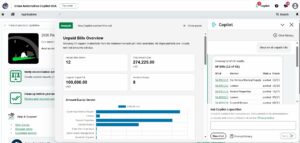
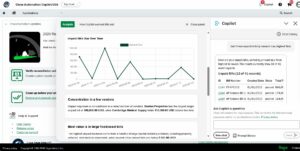
From there, the user can:
- Scroll through bill-level detail in the panel
- Copy or export the table to CSV for Excel
- Open the records directly in the Sage Intacct AP bill list view
- Select “View Analysis” for supporting tables, charts, or summaries
- Review “How Copilot worked this out” to see how the answer was produced before sharing it
The same question across industries:
- Construction: What’s been billed against this job?
- Nonprofit: What’s been spent against this grant?
- Professional services: What vendor costs have hit this client engagement?
Explore more AI integration in Sage Intacct: Connecting Sage and Claude.
Why now: Make AI part of how your team works
The real value of AI comes from building it into your routines. Teams that start using the Finance Intelligence Agent now can:
- Build habits early by making it the first stop for daily questions
- Tailor a prompt set to their own entities, projects, and reporting needs
- Measure the impact in hours saved, faster month-end support, and quicker responses to leadership
- Learn to evaluate AI-assisted answers before demands on finance grow
How CLA can help with Sage Intacct’s Finance Intelligence Agent
CLA’s Sage Intacct team helps organizations across industries get more from their current investment. We can help you:
- Enable the Finance Intelligence Agent in your environment
- Build a custom prompt library for your team
- Train users to get value quickly
- Find more ways to improve your Sage Intacct system
 Tags
Contact us
Put Sage Intacct’s AI to work for your finance team. Complete the form below to connect with CLA.
Connect

Ashley Hunt
Principal


Experience the CLA Promise
Sign up to receive custom information and insights delivered straight to your inbox.